
Smarter Sports Management with AI-Powered Features in SportsPlus
SportsPlus is using AI to aid in five known areas of sports management: content development, schedule generation, game and player reporting, product support, and public website assistance. AgentSam helps users get answers about SportsPlus and ClubCaptain addresses queries from visitors with resources available on a company’s public website. SportsPlus has announced a redesigned website experience that includes webmaster tools to assist greater online discoverability however as of September 14, 2026 the full Webmaster AI feature set has not been publicly revealed.
Key takeaways
-
SportsPlus AI is a group of integrated features, not a single standalone tool.
-
It can generate or improve website pages, program descriptions, forms, volunteer tasks, facility descriptions, shop content and sponsorship information.
-
League and tournament administrators can use it to generate schedules, pool play structures and brackets based on defined requirements.
-
AgentSam answers questions about SportsPlus. ClubCaptain answers public website questions about a specific sports organization.
-
AI-generated schedules, reports, policies and public messages should be reviewed by an accountable staff member before they are used.
-
Webmaster AI and the next SportsPlus website experience should be described as announced or coming soon until SportsPlus confirms general availability and publishes the final capability list.
SportsPlus AI features at a glance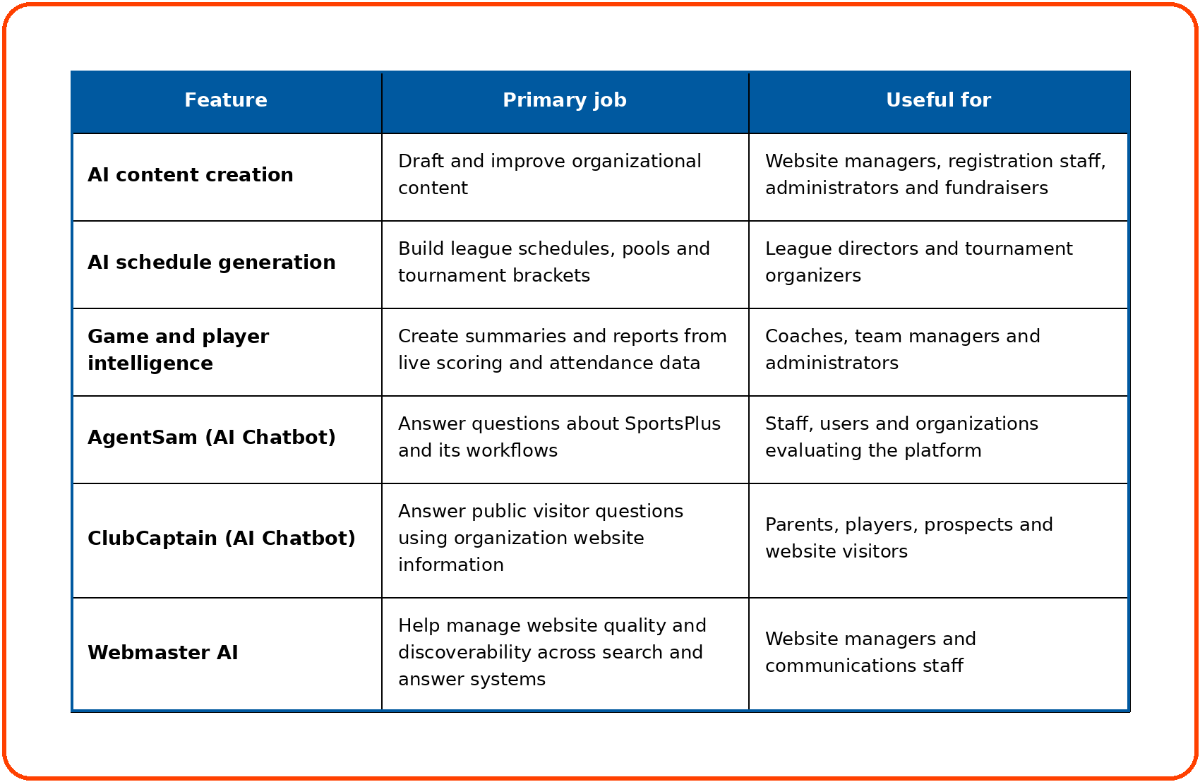
The current SportsPlus AI page documents content, scheduling, reporting and AgentSam features. A separate ClubCaptain page documents the public website chatbot. SportsPlus has announced a new website experience with webmaster tools, but its detailed public specification remains limited. 5
What is SportsPlus AI?
SportsPlus AI is a collection of AI-assisted capabilities built into SportsPlus sports management workflows. It helps organizations generate information, organize competitions, interpret operational data and answer questions.
The capabilities fall into four practical categories:
-
Generation: Writing pages, program descriptions, summaries and reports.
-
Optimization: Producing a schedule from defined competition requirements.
-
Retrieval: Finding and explaining relevant information through a chatbot.
-
Discovery: Helping website information become easier for people, search engines and answer systems to understand.
This distinction matters because the features do not all work in the same way. A content assistant creates a draft. A schedule generator works with constraints. A chatbot retrieves information from a knowledge source. Each one requires different data and a different review process.
How does SportsPlus AI create and improve content?
SportsPlus AI can generate new content from a prompt or improve rough text already entered by an administrator. The documented use cases include website pages, program information, forms, documents, volunteer tasks, facility descriptions, shop items, donation campaigns and sponsorship packages.
Website and program content
A club opening registration for a youth basketball program might begin with a few notes:
-
Ages 9 to 12
-
Saturday games
-
Evaluations in October
-
Registration closes September 30
-
Uniform included
AI can turn those notes into a readable program overview. The administrator should then verify the dates, eligibility requirements, fees, refund terms and included items before publishing.
This is more useful than asking a general writing tool to create generic sports copy because the draft is produced inside the workflow where the content will be managed.
Forms, policies and documents
SportsPlus AI can improve summaries and explanatory text for forms, policies, waivers and internal documents. It can help make a dense paragraph easier for a parent or volunteer to understand. 5
It should not be treated as a substitute for legal review. An AI-generated waiver, safeguarding policy or refund policy may sound polished while still omitting a required term. Use AI to improve clarity, not to determine the organization’s legal obligations.
Volunteer, facility and operational information
Volunteer coordinators can use AI to create clearer role descriptions, shift instructions and task summaries. Facility managers can draft descriptions of fields, courts, complexes and booking requirements.
A useful volunteer description should answer four questions:
-
What is the volunteer expected to do?
-
When and where is the task performed?
-
What skills, clearances or equipment are required?
-
Who should the volunteer contact with a problem?
AI can prepare the first draft. The volunteer coordinator remains responsible for confirming the operational details.
Shop, donation and sponsorship content
The documented SportsPlus use cases also include product descriptions, donation items, campaign explanations and sponsorship packages.
This can help an organization explain the purpose of a fundraiser or distinguish one sponsorship level from another. Staff should still verify prices, benefits, fulfillment terms and tax-related wording before the content is published.
Can SportsPlus AI generate league and tournament schedules?
Yes. SportsPlus documents AI-assisted generation of conflict-free league schedules based on event requirements and constraints. It can also develop tournament pool schedules and brackets.
The main benefit is a faster starting point. Instead of placing every matchup into a spreadsheet manually, an administrator can define the competition structure and use the system to generate an initial schedule.
What should be reviewed before a schedule is published?
A generated schedule should be checked for:
-
Team and facility conflicts
-
Venue availability
-
Blackout dates
-
Required rest periods
-
Travel expectations
-
Age-group restrictions
-
Coach conflicts across multiple teams
-
Official availability
-
Opening and closing times
-
Tournament progression rules
-
Weather or contingency plans
Not every constraint will apply to every organization. The important step is to document the rules before generation and review the result afterward.
A schedule can be technically conflict-free while still being inconvenient or unfair. For example, a team might receive several early games or repeated long-distance trips. Human review catches issues that are difficult to express as simple scheduling rules.
How does SportsPlus generate game and player reports?
SportsPlus can use live scoring and attendance information to produce game summaries, team reports, individual player performance reports and player attendance reports.
Game summaries
A game summary turns structured score information into a readable recap. It can help a league or team publish an update without requiring a volunteer to write the entire report after the game.
The final version should still be checked for:
-
Correct names
-
Correct score
-
Accurate sequence of events
-
Neutral tone
-
Appropriate language for youth players
-
Missing context that the scoring data could not capture
Team performance reports
A team report can organize live scoring data into a summary that is easier for coaches and administrators to review.
Statistics explain what was recorded. They do not always explain why it happened. A coach may need to add context about competition level, player roles, injuries, tactical objectives or an incomplete scorekeeping record.
Player performance and attendance reports
Individual reports can help coaches organize recorded performance and attendance information. They should support coaching conversations, not replace them.
Player selection, playing time and development decisions should not be based solely on an automatically generated report. Attendance data may be incomplete, and performance statistics may not capture communication, effort, positioning, teamwork or the instructions a player was asked to follow.
What is the difference between AgentSam and ClubCaptain?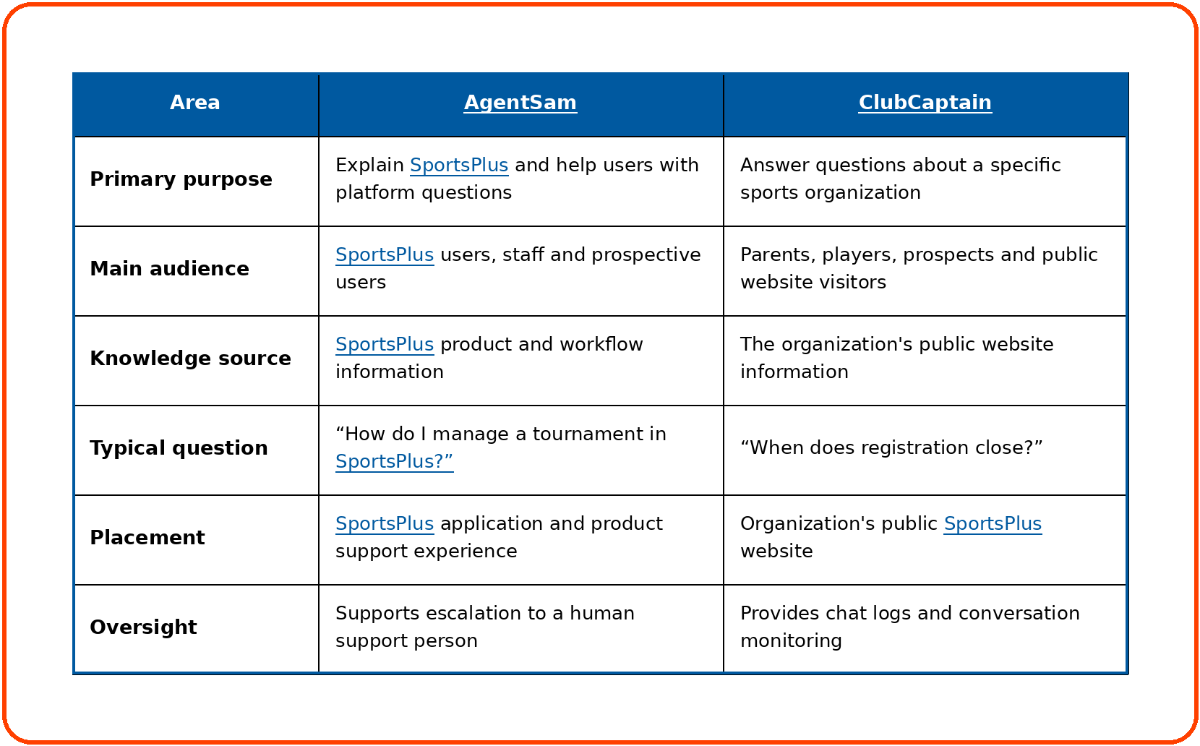
AgentSam and ClubCaptain are separate assistants with different audiences and knowledge sources.
SportsPlus introduced AgentSam as an in-app assistant in March 2026. Its role is to help people find answers about SportsPlus and navigate the platform more efficiently. SportsPlus also documents an option to escalate to human support.
ClubCaptain is trained on public website information such as programs, schedules, documents, policies and game rules. SportsPlus states that administrators can review chat logs and monitor responses.
What should ClubCaptain answer?
Good public questions include:
-
When does registration open?
-
Where is Saturday’s game?
-
What ages can join the program?
-
What equipment does a player need?
-
Where can I find the weather policy?
-
What are the tournament rules?
-
How do I contact the club?
Because the current product page says ClubCaptain uses public website data, it should not be positioned as providing private account-specific information such as a family’s payment balance or a player’s confidential profile unless SportsPlus verifies a separate authenticated capability.
This boundary protects both accuracy and privacy. It also gives staff a simple publishing rule: if an answer should be available through the public chatbot, the source information must first be accurate and appropriate for the public website.
What is SportsPlus Webmaster AI?
SportsPlus Webmaster AI is the planned intelligence layer associated with the next SportsPlus website experience. SportsPlus has publicly announced an upgraded website builder with an AI chatbot, live-synced data and webmaster tools, but the detailed Webmaster AI controls and general availability date have not yet been publicly documented.
Its intended value should be understood across three connected areas: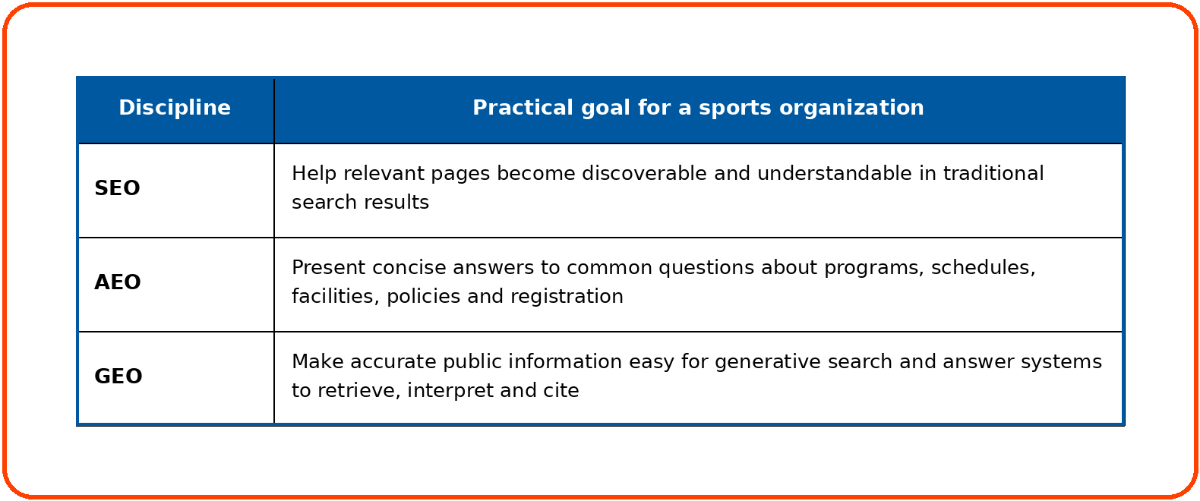
Google states that the same core SEO practices continue to matter for AI Overviews and AI Mode. Useful, original and crawlable information remains more important than creating special content solely for AI systems. Bing’s AI reporting also shows that visibility can be assessed through citations, cited pages and grounding queries.
A useful webmaster system for sports organizations should help administrators maintain:
-
Clear page titles and summaries
-
Accurate program and registration information
-
Consistent organization, facility and team names
-
Direct answers to common parent questions
-
Current schedules and event information
-
Descriptive image alternative text
-
Logical internal links
-
Accessible, mobile-friendly pages
-
Visible publication and update dates
-
Search performance and indexing controls
These are recommended outcomes, not a confirmed list of SportsPlus Webmaster AI functions. SportsPlus should publish the exact feature specification when the product becomes generally available.
No webmaster or AI tool can guarantee first-page rankings, featured snippets, AI Overview placement or citations from ChatGPT, Perplexity, Gemini, Claude or another answer system.
How can different sports organizations use SportsPlus AI?
The most useful SportsPlus AI feature depends on the work an organization needs to complete.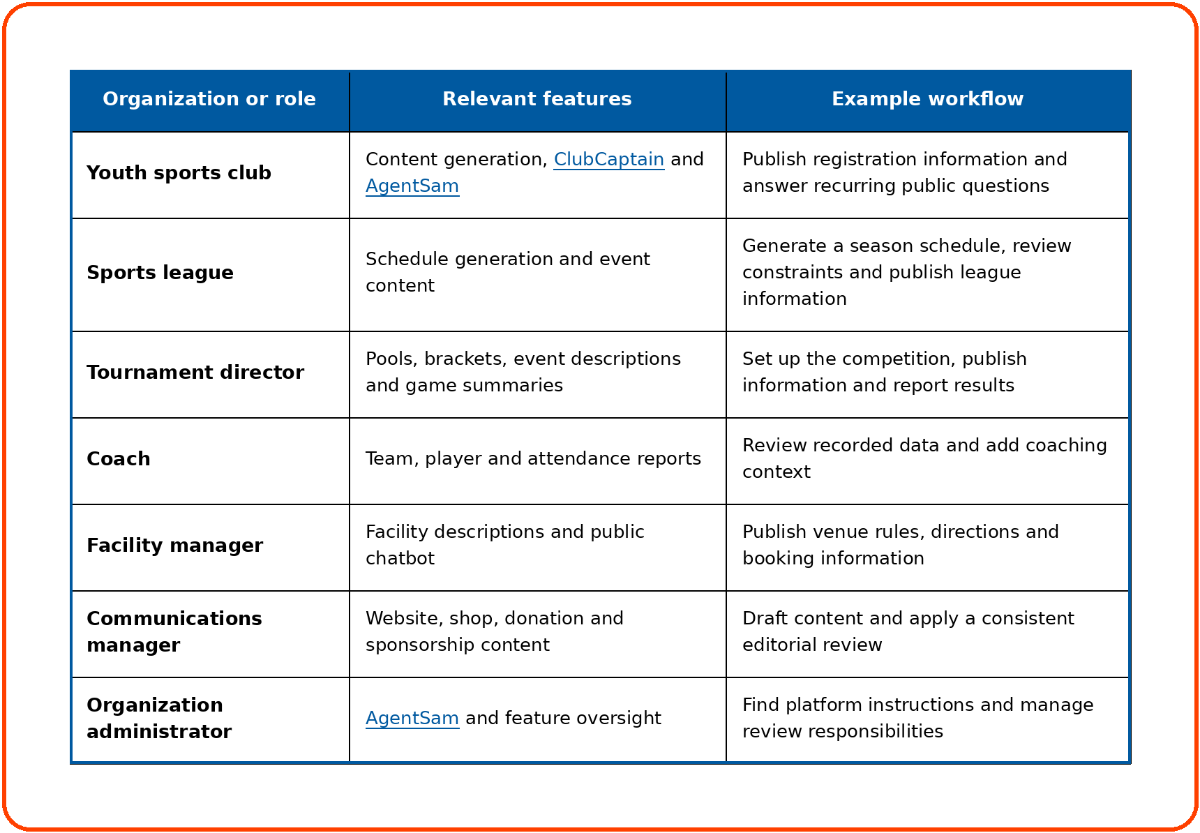
The common pattern is simple: the AI prepares, organizes or retrieves information, while the responsible staff member verifies it.
Four practical SportsPlus AI workflows
1. Opening registration for a new program
-
Enter the known program details.
-
Generate an initial program overview.
-
Verify eligibility, dates, fees, discounts and refund terms.
-
Publish the approved registration page.
-
Add answers to recurring public questions.
-
Let ClubCaptain retrieve those answers from the public website.
-
Review chat logs to identify missing information.
This workflow links content creation with public support. If visitors keep asking the same unanswered question, the website probably needs a clearer answer.
2. Building a league schedule
-
Define teams, divisions, facilities and date ranges.
-
Add known restrictions and blackout dates.
-
Generate the initial schedule.
-
Review conflicts, rest periods, travel and fairness.
-
Correct any missing constraints.
-
Generate again if necessary.
-
Approve and publish the final schedule.
The schedule generator should reduce placement work, not remove the director’s accountability for the competition.
3. Publishing a post-game recap
-
Record the score and supported statistics through live scoring.
-
Generate the game summary.
-
Confirm names, scores and key events.
-
Add context that was not present in the data.
-
Remove language that could embarrass or single out a youth player.
-
Publish the approved recap.
This process is faster than writing from a blank page, but it still produces an editorially reviewed report.
4. Reducing repetitive support questions
-
Use AgentSam for questions about how SportsPlus works.
-
Use ClubCaptain for questions about the organization’s public programs, schedules and policies.
-
Keep private member questions inside authenticated or staff-managed support channels.
-
Review recurring chatbot questions.
-
Update the website when visitors cannot find a clear answer.
The goal is not to prevent people from reaching staff. It is to resolve straightforward questions quickly and send sensitive or unusual cases to the right person.
What should remain under human control?
AI can support operational decisions, but it should not become the final authority for legal, safety, eligibility, privacy or player-development decisions.
NIST’s AI Risk Management Framework recommends managing AI risks throughout design, deployment, use and evaluation. For a sports organization, that means knowing what data powers a feature, testing the output, assigning responsibility and monitoring what happens after the feature is enabled.
Legal and policy approval
Waivers, safeguarding policies, refund terms and disciplinary rules need review by qualified staff and, where appropriate, legal counsel.
Schedule safety and fairness
An administrator should confirm that a generated schedule follows competition rules, facility restrictions and appropriate rest expectations.
Player evaluation
AI-generated player reports can organize recorded information. Coaches and evaluators should make final development and selection decisions using broader evidence and direct observation.
Children’s information
Organizations serving children may have obligations under COPPA and other privacy laws, depending on how their websites and online services collect, use or disclose personal information. The FTC’s amended COPPA guidance addresses parental consent, data minimization, security, retention and deletion for covered services involving children under 13.
Sports organizations should avoid placing private player, family, medical, payment or disciplinary information into public-facing AI tools.
Public communication
A polished sentence can still contain an incorrect date, fee or policy. A named staff member should approve public website content, registration details and organization-wide messages.
Use the GAMES framework before publishing AI output
The GAMES framework gives sports administrators a repeatable review process.
G: Ground it in current information
Use current schedules, approved policies, complete scores and accurate program details. Outdated source data produces outdated answers.
A: Assign an accountable reviewer
Identify who approves each type of output. A league director might approve a schedule, while a communications manager approves a public article.
M: Minimize sensitive data
Give a feature only the information required for the task. Public website chatbots should use public information. Private player and family data should remain protected by appropriate permissions.
E: Examine the result
Check names, numbers, dates, links, tone, fairness, privacy and missing context. Review what the AI did not include, not only what it generated.
S: Send or publish only after approval
Publish the approved version, then monitor questions, corrections and user feedback. An output that was accurate last season may not be accurate now.
What should you ask before enabling a SportsPlus AI feature?
Ask these questions during implementation or a product demo:
-
Is the feature generally available or still in development?
-
Which SportsPlus plans include it?
-
Are there usage limits or additional fees?
-
What data does the feature use?
-
Does it access public information, private information or both?
-
Which staff roles can enable or configure it?
-
Can users edit the output before publication?
-
Are conversations, changes or generated outputs logged?
-
Can an administrator correct an inaccurate answer?
-
Can the question be escalated to a human?
-
Which sports, competition formats and scheduling constraints are supported?
-
How are data retention and deletion handled?
-
Can the organization disable the feature without losing its content?
-
How will SportsPlus document future product changes?
The public SportsPlus pages reviewed for this article do not specify whether every AI feature is included in every subscription level. Organizations should confirm current plan eligibility and usage limits before purchasing or enabling a feature.
Start with one workflow, not every feature
The best first AI project is a bounded, repetitive task with a clear reviewer. A club might begin with registration page drafts. A league could test schedule generation. A tournament director might start with game recaps. A website manager could prepare ClubCaptain by reviewing public program and policy pages.
Measure whether the feature reduces repeated work, improves clarity and produces output that staff can approve confidently. Then expand to the next workflow.
SportsPlus brings content, competition management, reporting and support into the same sports management environment. The next step is to choose the workflow creating the most avoidable administrative work and evaluate it in a guided SportsPlus demo.
Frequently Asked Questions
What is SportsPlus AI?
SportsPlus AI is a set of AI-assisted features within the SportsPlus sports management platform. It supports content creation, schedule generation, game and player reporting, product guidance and public website questions.
What AI features are available in SportsPlus?
Publicly documented features include AI-assisted content creation, conflict-free league schedule generation, tournament pools and brackets, game summaries, team and player reports, attendance reports, AgentSam and ClubCaptain.
Can SportsPlus AI generate a league schedule?
Yes. SportsPlus states that its AI features can generate conflict-free league schedules based on event requirements and constraints. Administrators should review the result before publishing it.
Can SportsPlus create tournament pools and brackets?
Yes. SportsPlus documents the ability to develop pool schedules and tournament brackets. Tournament directors should confirm progression rules, venue assignments, rest periods and timing.
Can SportsPlus AI write website content?
Yes. It can generate or improve page headlines, descriptions, summaries, program information, facility descriptions and other website content. Staff should verify all operational details before publication.
Can SportsPlus AI write waivers and policies?
SportsPlus documents AI assistance for documents, waivers and policy summaries. Organizations should use this capability for drafting and clarity, not as a replacement for legal review.
Can SportsPlus create game summaries automatically?
SportsPlus can generate game summaries using live scoring statistics. The summary should be reviewed for score accuracy, names, tone and missing context before it is published.
What is AgentSam?
AgentSam is the SportsPlus AI assistant for product and workflow questions. It helps users find answers about SportsPlus and can connect them with human support when needed.
What is ClubCaptain?
ClubCaptain is an AI chatbot for an organization's public SportsPlus website. It uses public website information, including schedules, programs, documents, policies and rules, to answer visitor questions.
Are AgentSam and ClubCaptain the same chatbot?
No. AgentSam explains SportsPlus and its workflows. ClubCaptain answers questions about a specific organization using that organization's public website information.
Does ClubCaptain use private player information?
The current SportsPlus product page states that ClubCaptain uses public website data. It should not be assumed to access private player, family or payment information unless SportsPlus documents an authenticated capability.
Can Webmaster AI guarantee Google rankings or ChatGPT citations?
No. Google states that helpful, original, crawlable content and established SEO practices remain relevant to AI search features, but no tool can guarantee rankings, AI Overview inclusion or citations from an answer engine.
Are all SportsPlus AI features included in every plan?
The public pages reviewed do not clearly map every AI capability to a specific subscription plan. Confirm plan eligibility, limits and any additional costs with SportsPlus before enabling a feature.

Nathan Uppara
Digital Marketing Lead at SportsPlus
Nathan Uppara is the Digital Marketing Lead at SportsPlus, where he helps sports organizations discover better ways to manage registration, payments, scheduling, communication, websites, and mobile apps. He combines his experience in digital marketing and sports technology to create practical content and resources for clubs, leagues, and sports organizations.
Recent
What Should a Modern Sports Organization Website Actually Do?
Oct 2, 202633
Why Generic Website Builders Dont Work for Sports Organizations
Sep 18, 202651
SportsPlus Release Notes-June 30, 2026
Jul 1, 202669
SportsPlus Release Notes-June 09, 2026
Jun 10, 202680
SportsPlus Release Notes-May 19, 2026
May 20, 202671


